Rebuilding Design History with AutoTimeline
How AI turns history-less geometry into editable parametric designs in Fusion
Why design history matters: A parametric timeline records how a part was built: each extrude, fillet and pattern, in order. That record is what makes a part easy to edit. Imported STEP files and direct-modeling bodies arrive without one, so every change becomes manual surgery on the geometry.
What AutoTimeline does: Presented at AU 2026, AutoTimeline is an AI-powered feature recognition capability in Fusion. It looks at a solid body with no history and reconstructs a plausible, editable timeline that rebuilds it.
How AutoTimeline uses AI: A model trained on parametric designs reads the faces of a part and predicts a sequence of features: each feature’s type, the faces it accounts for, and the order they come in. Because a part can be built in more than one sensible way, the model can generate several candidate timelines. Each candidate is rebuilt and checked against the original geometry before a result reaches the user.
Announced at AU 2026, AutoTimeline is a new capability in Fusion that reconstructs editable parametric design history from history-less geometry. In this post, go behind the scenes to explore why the problem is harder than it looks and how we use AI to turn a “dumb” solid back into an editable timeline.
A part with no memory
Anyone who has imported a STEP file from a supplier knows the feeling. The geometry is all there, faces, edges, fillets, holes, but the part has no memory of how it was made. Direct-editing tools are great for local tweaks: push a face, move a hole, resize a fillet. But what if the bolt circle needs six holes instead of four, all evenly re-spaced? That isn’t a tweak to one face. It is a change to how the design is organized, and it is exactly what a timeline is for: change one value, the pattern count, and let the model rebuild around it. Without a timeline, you are left deleting, copying and re-positioning holes one by one, or rebuilding the part from scratch.
This happens all the time. Parts come from other CAD systems, from customers and suppliers, from legacy archives, or from direct-modeling sessions where history was never captured. In each case, the design intent that made the original part easy to change has been lost in translation.
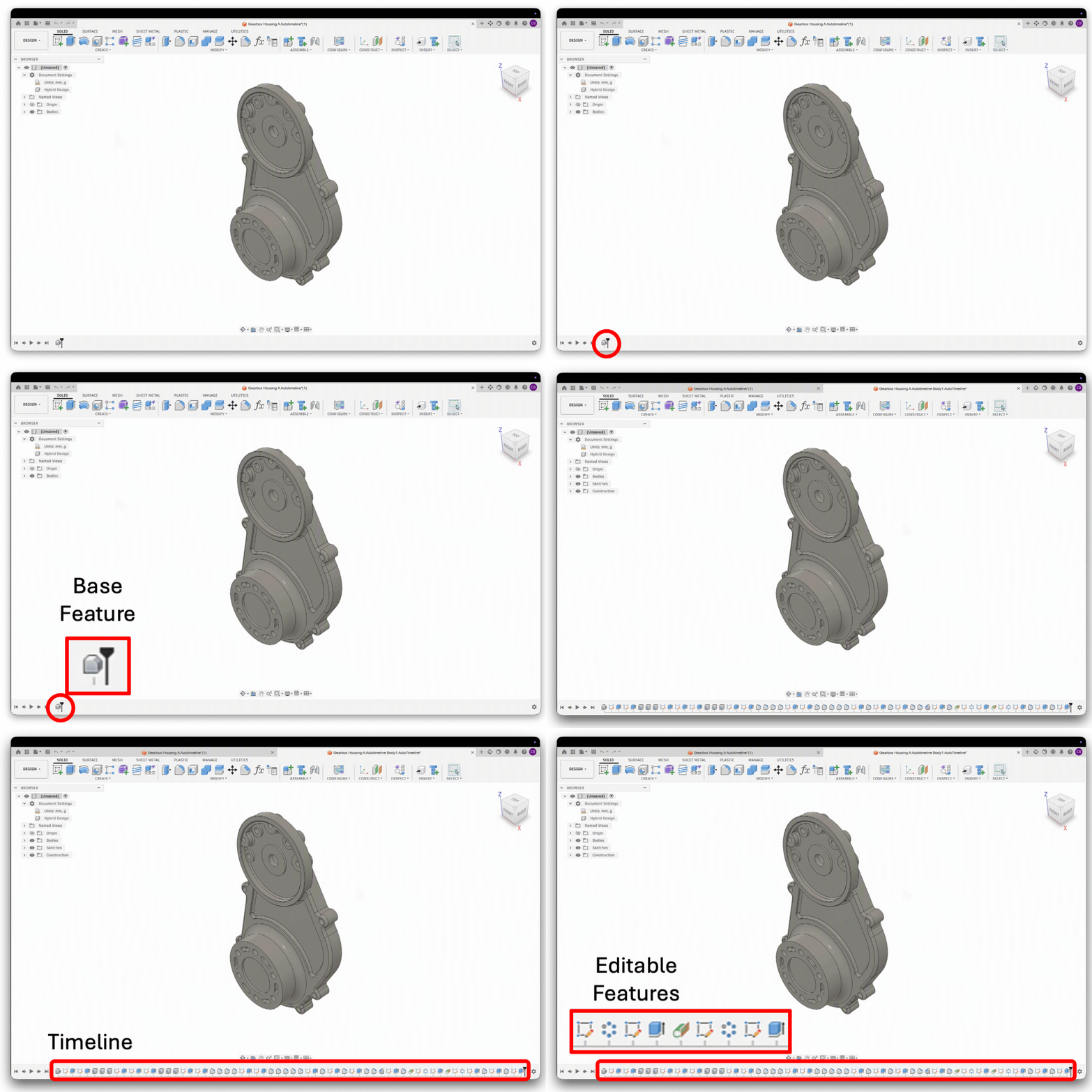
A CAD model without a timeline is difficult to edit. A timeline captures the design intent and allow for meaningful modifications.
Rebuilding a timeline by hand is skilled, tedious work. An experienced designer studies the part, decides which shapes were probably sketched and extruded first, which were cut away, where the fillets and chamfers went, and which features were patterned. Then they recreate each one in a sensible order. AutoTimeline aims to take that effort off the designer’s plate.
Reading a part like a designer would
When designers rebuild a part, they are doing feature recognition in their heads. They see a group of faces and think “that’s an extrusion”. They see a rounded strip and think “that’s a fillet on that edge”. They see eight identical holes and think “that’s a circular pattern”. And they work out an order along the way: a fillet can only come after the edge it rounds exists.
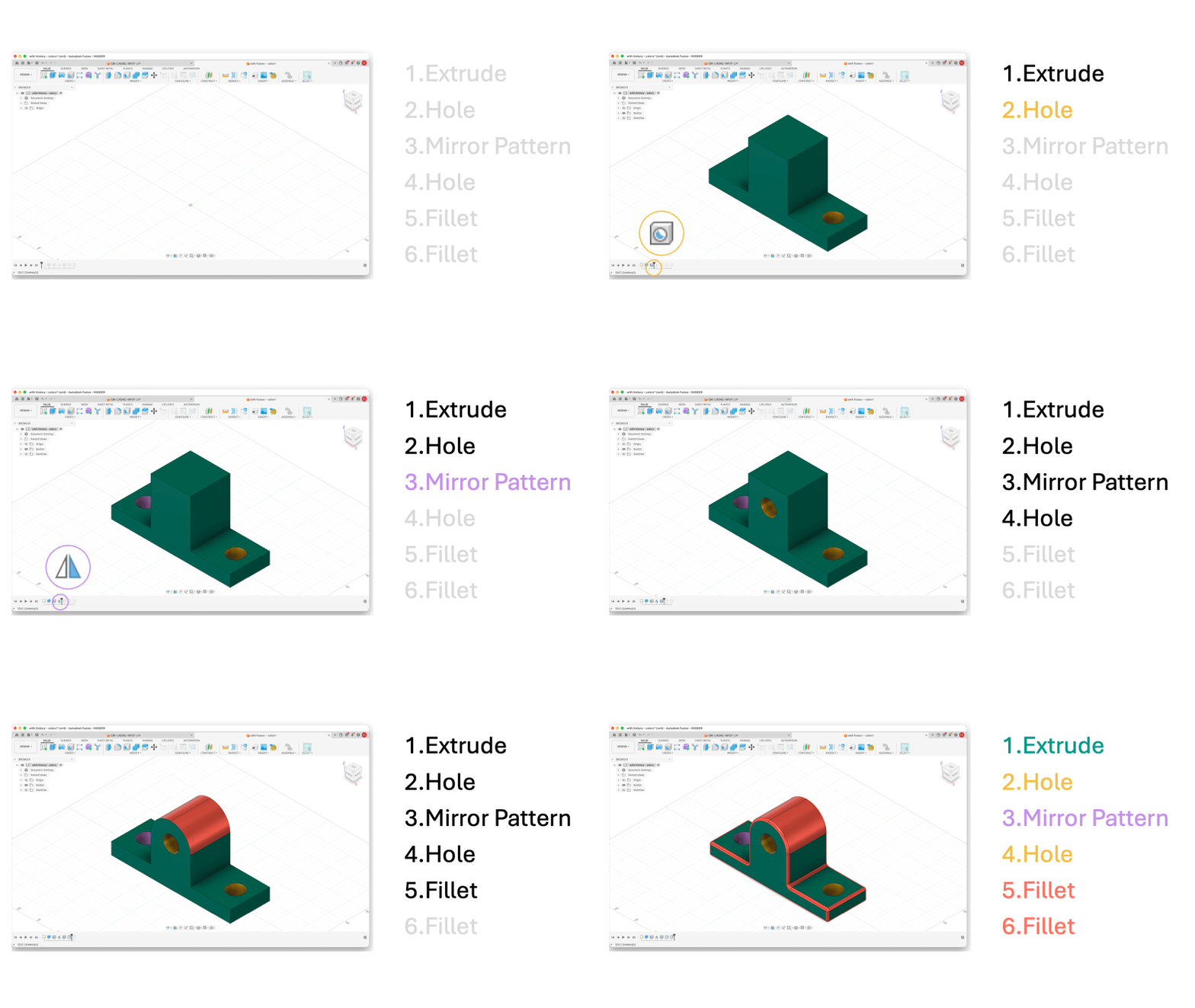
Designers construct CAD parts following a sequence of features, each creating or modifying faces.
AutoTimeline learns to do the same thing. Its input is the solid’s boundary representation, or B-Rep: the faces, edges and connections that describe a CAD body. Its output is a timeline, an ordered list of features. Each entry says two things:
-
What kind of operation it is, such as an extrude, a fillet or a pattern.
-
Which faces of the part it accounts for in the final body.
There is an honest limit here. Different modeling choices can produce the same shape, and later operations can erase the evidence of earlier ones. So AutoTimeline isn’t recovering the history. It is proposing a plausible one that rebuilds the part and is editable.
From a solid body to a timeline
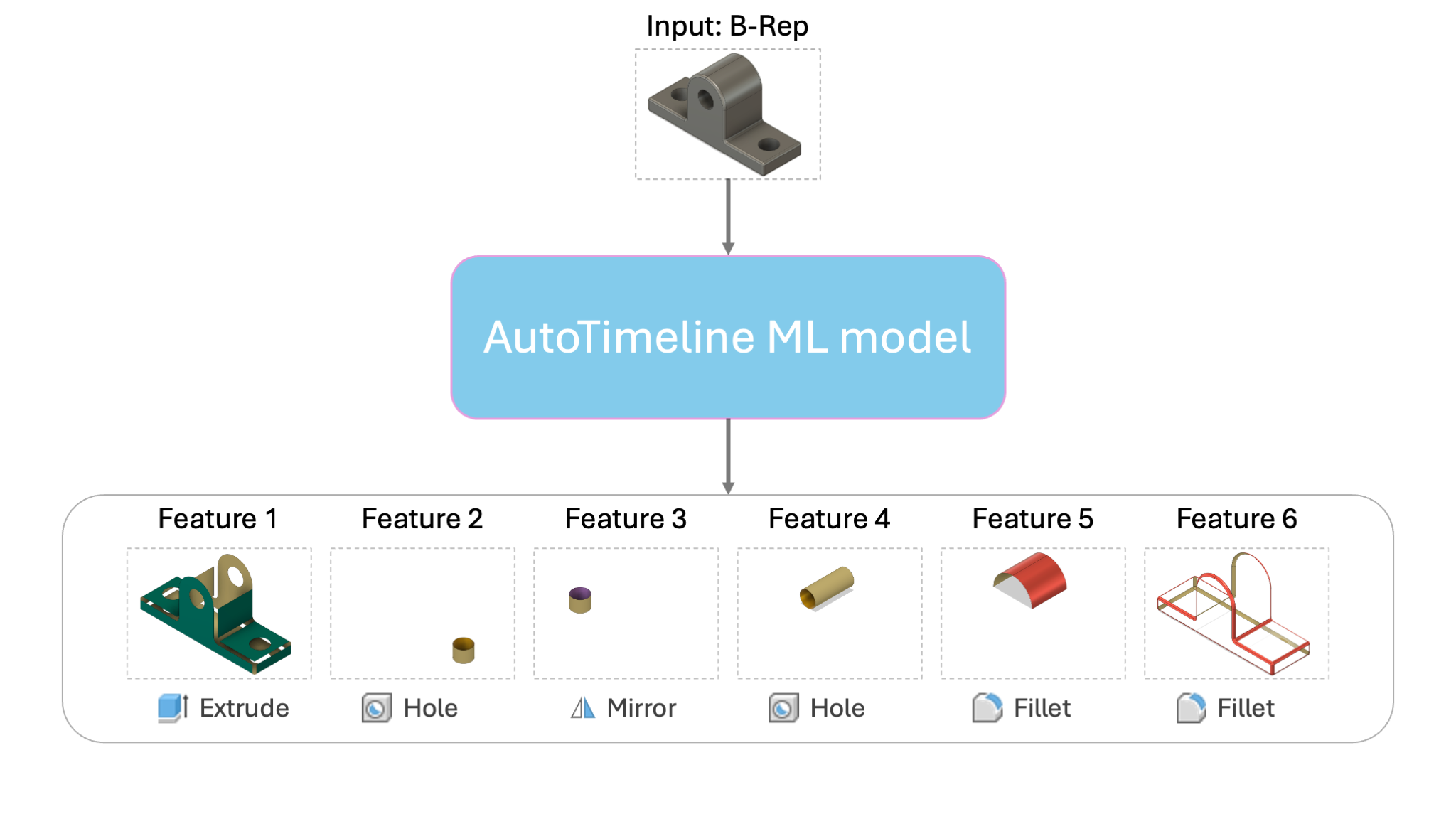
The AutoTimeline model takes as input a B-Rep geometry and predicts an ordered sequence of features and the list of faces that were created from each.
Before a neural network can reason about a part, the part has to become numbers. That is harder for a solid than it sounds. Faces can be flat, cylindrical or freeform, and there is no limit on how many a part can have. We handle every face the same way: we sample a small grid of points across its surface and record each point’s position and surface normal. This idea comes from UV-Net by Jayaraman and colleagues. Faces are not read in isolation. Wherever two faces share an edge, we link them in a graph, the same cue a designer uses to tell that a rounded strip is a fillet between two neighbors. A geometry encoder reads this graph and produces one compact description per face.
A Transformer decoder then writes the timeline one step at a time, like a language model writing a sentence. At each step it looks back at the face descriptions and at everything it has written so far. So the model can decide that a fillet makes sense because it already placed the extrusion that created the edge, instead of classifying each face in isolation.
Here is the twist. A chatbot picks each next word from a fixed dictionary. AutoTimeline can do that for feature types, since there is a short, known list of them, but not for faces. The faces it needs to name belong to this particular part, and every part has a different number of them. “Face 14” means something different in every solid we feed it. So we pair the decoder with a pointer network: instead of choosing a word from a vocabulary, the model points directly at faces of the input. We took the same approach in our earlier work on AutoConstrain, where the model pointed at sketch curves instead of faces.
Put together, the output reads like a very compact recipe: a type, the faces it accounts for, an end marker, then the next feature. For example, “Extrude → faces 1, 2, 3 → end · Fillet → face 4 → end · …”. The order of those groups is the predicted timeline.
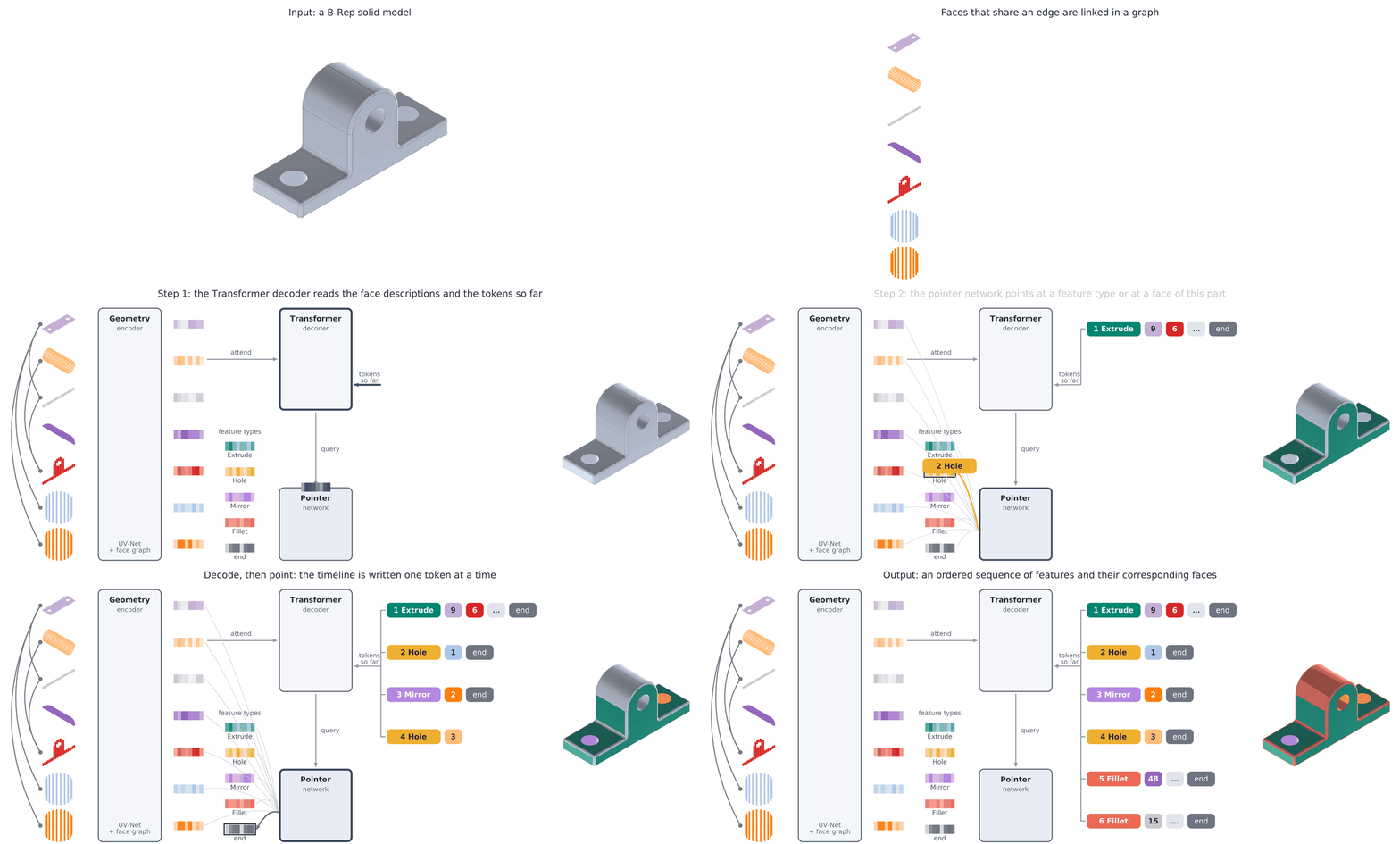
The AutoTimeline ML model consists of three main components: a geometry encoder, a transformer decoder and a pointer network.
Learning from design histories
AI models learn from examples. To train AutoTimeline, we started from a large collection of parametric designs that still have their timelines. For each design we know both the final solid and the features that produced it, including which faces each feature accounts for.
Then we hide the history and ask the model to recover it. Given only the final geometry, the model predicts a timeline, and during training we compare that prediction with the recorded one. Over many designs it picks up the habits designers share: base shapes tend to be extruded or revolved early, cuts and holes come next, and finishing touches like fillets and chamfers usually come last. These are tendencies, not rules, and the model learns when to break them.
Many valid answers, one that rebuilds
There is rarely a single correct answer. One designer might extrude a profile that already contains a pocket; another might extrude a solid block and cut the pocket afterward. Both reach the same shape, but leave different features to edit later. So matching the recorded history step for step is only one measure of success. What really matters is a timeline that works and makes sense.
We treat that ambiguity as a strength. Under the hood, the model doesn’t have to commit to one answer: from the same body, it can generate several candidate timelines. Some are more compact; others break the design into more, simpler steps or make different choices about ordering and patterns. This is a capability of the model itself, and it gives us more than one chance to find a timeline that works.
But a timeline that looks right isn’t enough. A fillet radius that drifted or a hole that moved half a millimeter is not a part a designer can trust. That is why AutoTimeline does not stop at prediction. Leveraging Fusion’s modeling capabilities, we execute a candidate’s features and check, geometrically, that the resulting body matches the original within tolerance. Only a timeline that passes this check makes it into your design.
The result is a regular Fusion timeline, so everything that works on a hand-built timeline works here too. You can roll back, edit a feature’s dimensions, suppress a fillet, or add new features on top. For teams moving data from other CAD systems into Fusion, imported parts can keep evolving instead of becoming frozen geometry.
What we learned, and what comes next
Building AutoTimeline taught us two lessons. First, recognizing what a feature is turned out to be only half the problem. Deciding which faces belong to it, and in what order features are applied, is where most of the difficulty lies. Second, AI works best alongside the capabilities Fusion already has. The model proposes; Fusion’s geometry validation confirms. Together they give designers results that are both intelligent and reliable, because “close enough” isn’t good enough when you are designing physical products.
The goal is simple: when you inherit geometry without history, you shouldn’t have to start from scratch. AutoTimeline sits alongside AutoConstrain and AutoAssemble in a broader effort to automate the repetitive parts of design in Fusion, so designers can spend more time on the decisions where their expertise matters most.
AutoTimeline is currently available to members of the Autodesk Fusion Insider Program, and will be available to the general public soon. Give it a try on your trickiest imported part, and tell us what you find.
All figures presented in this article are for illustrative purposes only.
Get in touch
Have we piqued your interest? Get in touch if you’d like to learn more about Autodesk Research, our projects, people, and potential collaboration opportunities
Contact us